

.png)

.png)

Alarm.com Security Cameras & Video Doorbells: How They Work

Updated: Mar 3
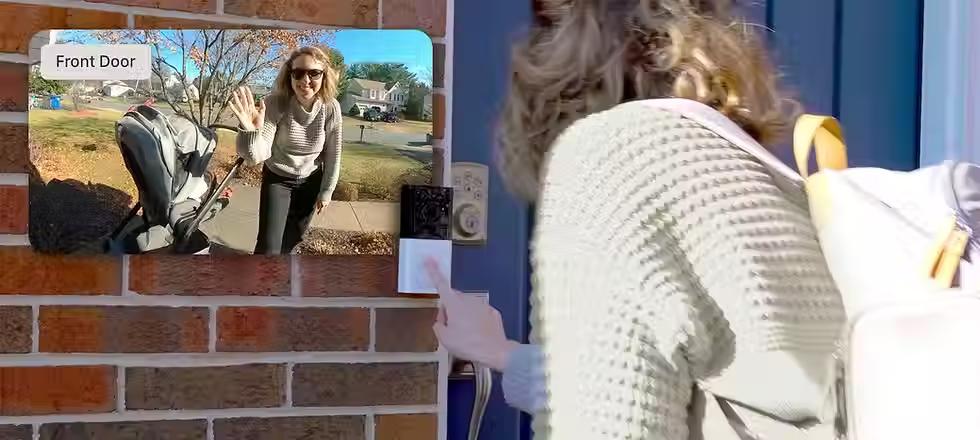
Video Verification Done Right: How Alarm.com Cameras + Doorbells Reduce Uncertainty When Something Happens
If you’re a seasoned insurance agent, you already know the pattern:
A client reports “something happened.”
The story is vague.
The timeline is fuzzy.
Everyone is trying to make decisions with incomplete information.
That uncertainty is where losses drag out, stress escalates, and claims conversations get messy.
At SecuraCore, we install Alarm.com-based security and surveillance systems across Central Oregon. When we talk about cameras and doorbells, we don’t frame them as gadgets. We frame them as visibility—a way to reduce uncertainty and make it easier for owners (and the people advising them) to understand what actually occurred.
This post is written for insurance agents who want accurate, practical language to explain why a modern video setup is more than “nice footage.” It’s a property protection tool that can support:
faster situational awareness
fewer unnecessary dispatches
cleaner event documentation
and calmer decision-making when a client calls you after an incident
Quick boundary: we don’t promise credits or outcomes
Carriers vary. Programs vary. Underwriting requirements vary.
So we keep this simple:
We do not promise premium discounts.
We do not claim video will prevent all losses.
We do design and install systems that increase awareness, reduce blind spots, and create clearer event records.
If your underwriter needs documentation of what’s installed, we can provide an equipment list/system summary, and if central station monitoring is active for the security side, we can provide a monitoring certificate.

The real value of video: reducing uncertainty in the moments that matter
Most clients think cameras are for “catching bad guys.”
In reality, cameras and doorbells earn their keep in much more common scenarios:
Did the package arrive? Was it stolen—or never delivered?
Did a contractor actually show up when they said they did?
Was that noise a person, a vehicle, a deer, or the wind?
Did the garage door get left open? For how long?
Was there a forced entry attempt—or just a door that didn’t latch?
When your client has clear footage and clear alerts, they waste less time guessing. That reduces panic-driven decisions (like unnecessary calls and frantic “I don’t know what happened” reporting).
“Video verification” in plain English
Video verification simply means this:
When an event occurs, the system can provide visual context quickly—so the owner can confirm whether it’s real, and respond appropriately.
That can be as simple as:
a doorbell clip showing who approached the front door
a perimeter camera showing whether someone actually entered the yard
a driveway camera clarifying whether a vehicle pulled in
And when video is integrated into the same platform as the security system (as it is with Alarm.com), it becomes easier to:
tie alerts to meaningful events
reduce false alarms caused by guesswork
and maintain a consistent record of what happened and when
Why Alarm.com cameras + doorbells work well in the real world
There are lots of cameras on the market. The reason we specify Alarm.com cameras and doorbells is because they’re designed to work inside a broader system—security, automation, and awareness—without creating app chaos.
Here’s what matters to clients (and what you can confidently say without hype):
1) Clear clips, not just “live view”
When something happens, clients need a recorded clip they can review—not a live view that’s already over.
We focus on setups that reliably capture:
approach zones
entry points
driveways
and areas that create the most confusion during incidents
2) Better notifications through analytics
A major reason people stop paying attention to cameras is alert fatigue.
Modern analytics can help distinguish between common motion sources (people/vehicles/animals), which makes alerts more meaningful.
The goal is simple: fewer useless pings, more actionable ones.
3) A single platform that keeps clients engaged
If a client has one app for the alarm, one app for the doorbell, another app for a couple Wi‑Fi cameras, and none of it talks to each other, the system becomes “that thing we installed” instead of “the system we use.”
With Alarm.com, clients can manage security, cameras, and doorbells in one ecosystem.
That matters because the system only reduces uncertainty if the client actually uses it.
The front door is the highest-ROI camera location
If you had to choose one camera to reduce uncertainty, it’s usually the front door.
A properly installed doorbell camera helps answer:
who approached
whether they rang/knocked
what time they were there
whether a package was dropped, picked up, or moved
It also helps with everyday “micro incidents” that create disproportionate frustration:
missed deliveries
unwanted solicitation
neighbor misunderstandings
“someone was on my porch” anxiety
Doorbells aren’t flashy. They’re just incredibly useful.
Cameras that match the property: clarity, reliability, and clean installs
A camera system is only as good as its plac

ement and reliability.
This is where professional design matters. We look at:
sightlines and obstructions
lighting (sun glare, porch lights, headlights)
mounting height and access
vandal resistance and tamper exposure
network and power strategy
Why we often use PoE (Power over Ethernet) cameras
In many higher-value homes and commercial environments, PoE cameras are preferred because they offer:
consistent power
stable connectivity
fewer Wi‑Fi dropouts
cleaner, more professional wiring
From an agent’s standpoint, you don’t need the technical details—just the practical result:
PoE systems tend to be more reliable and less prone to the “it stopped working” problem.
The biggest failure mode: alert fatigue and blind spots
If your client has cameras but still says “I don’t know what happened,” one of two things is usually true:
The cameras aren’t covering the right areas.
The alerts are so noisy that the client ignores them.
How we solve blind spots
We map:
approach paths
primary entry points
secondary entry points
garages and side yards
outbuildings (when relevant)
Then we place cameras where they answer real questions.
How we solve alert fatigue
We tune:
motion zones
sensitivity
analytics settings
notification rules (who gets what and when)
The best camera system is the one that produces calm, meaningful notifications—not constant noise.
How video helps when a client calls you after an incident
This is the part agents care about.
When your client has a modern, properly configured video system, you’re more likely to get:
a clear timeline
specific events (“a person approached at 2:14pm, returned at 2:18pm”)
and less emotional uncertainty
That doesn’t guarantee outcomes—but it often reduces confusion.
In plain terms:
Video doesn’t just record. It helps people make better decisions under stress.
What you can request from SecuraCore (documentation)
If you’re partnering with SecuraCore and underwriting needs clarity, we can provide:
Equipment list / system summary (cameras, doorbells, key devices)
Monitoring certificate (when central station monitoring is active for the security system)
This helps you document what’s actually installed without chasing model numbers or relying on screenshots.
Agent-friendly language (accurate, non-misleading)
If you want a clean way to position this to clients without overpromising, use something like:
“Cameras and doorbells reduce uncertainty. They help verify what happened, when it happened, and whether it’s a real event. It’s a practical loss-mitigation tool, especially if you travel or manage property remotely.”
And if the conversation moves toward underwriting or credits:
“Carrier requirements vary. If you need documentation, your installer should be able to provide an equipment summary, and if your security system is professionally monitored, a monitoring certificate.”
Who benefits most from video verification?
We see the biggest value for:
second homes and vacation homes
higher-value homes with frequent travel
properties with deliveries, contractors, or cleaners
small commercial sites with after-hours exposure
multi-tenant buildings and shared entrances
These are exactly the accounts where uncertainty is costly.
Work with SecuraCore

If you’re an insurance agent in Central Oregon and want a reliable local partner for Alarm.com cameras, doorbells, and integrated security—installed cleanly, configured correctly, and supported over time—reach out.
Tell us:
what types of accounts you write
what documentation underwriting typically asks for
and what your clients struggle to understand
We’ll align on a referral handoff that keeps clients protected and keeps your files clean.


Comments